---
title: "SwiftUI within UIKit: Connecting two worlds"
url: https://www.sofapps.it/blog/swiftui-within-uikit/
date: 2021-03-24
author: Costantino Pistagna
language: en
tags: [SwiftUI, Swift, Tutorial]
---
# SwiftUI within UIKit: Connecting two worlds
> A proof of concept born from a Clubhouse chat: instead of migrating a whole project, only the content of a UITableViewCell is rewritten in SwiftUI and hosted in a UIHostingController. UIKit talks to the SwiftUI view through NotificationCenter and Combine, and scrolling stays smooth. The approach is admittedly hackish, and the full code is on GitHub.
Last evening, I was involved in a very interesting Clubhouse room, talking about SwiftUI and Swift interoperability. The rest of the article is a proof-of-concept exploring some interesting ideas arisen with
Dimitri Giani, Stefano Mondino and Andrea Mengoli, during the chat.
SwiftUI comes with both interesting performances and facilities in creating even complex layout but moving a complete project from Swift to SwiftUI couldn’t be always feasible for a lot of reasons (framework maturity, time constraints, etc.). So, why don’t take the best from the two worlds?
There’re tons of tutorials and articles related to the use of **UIHostingController** that, as of today, seems to be the only viable solution to make the above propositions coming to light. However, last night we focused on a slightly different point-of-view:
>Moving only very small portions of code from Swift to SwiftUI.
For example, one of the most hated things that every iOS developer would like to skip is dealing with Storyboard for **UITableView/UICollectionView** cell design.
Wouldn’t be nice to migrate just the content of such UITableViewCell to SwiftUI for performance, maintanability and easiness purpouses, making also future-proof at least some portion of our code? That was the
Dimitri Giani proposition.
Everyone, including me, was sceptical since the use of UIHostingController seems a really complicated over-engineered approach for such performance-critical task (aka UIScrollView reusable components).
>Needless to say, I was wrong. At least, in a very early test discussed in the rest of this article, this approach — with some caveats — works like a charm, without any performance issue.
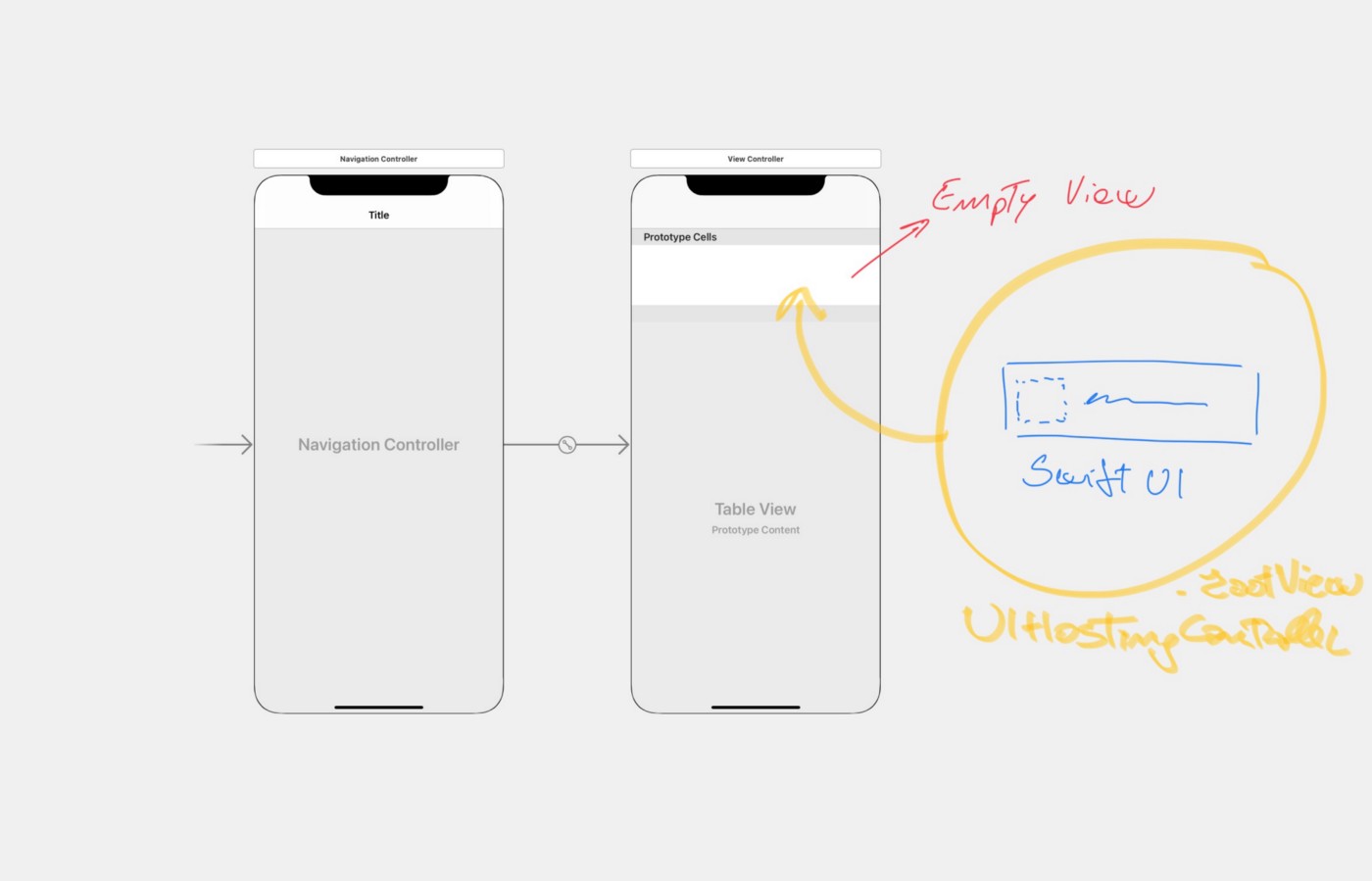
Above, there is a draft of what we would like to achieve. As you can see, the UITableViewCell needs to be aware of the corresponding UIHostingController **rootView** property and, since each UITableViewCell instance needs to be reusable we should keep those property unique.
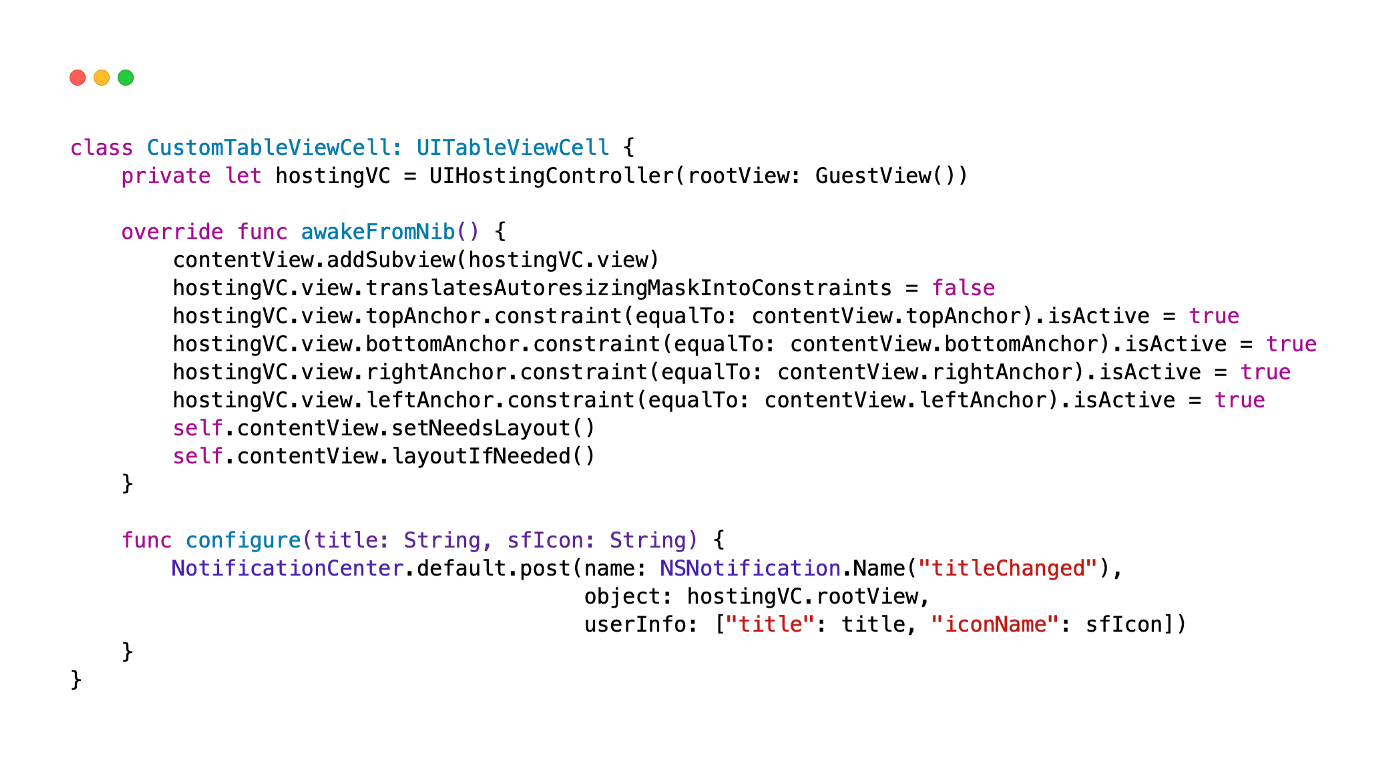
We make our CustomTableViewCell aware of that, by creating a private constant that instantiate a **UIHostingController** and configure that object in the very early **awakeFromNib** stage.
The *configure(title:sfIcon:)* method is just a placeholder that exploit the **Combine** / **publisher** approach in order to communicate with the corresponding **SwiftUI** view. Here, we send a plain Notification when we need to configure the corresponding SwiftUIView.
Please note, that we need to specify the **object** property, since, we would like to deal *just* with one instance of the object.
>Yep!, I’ve to admit, this looks really hackish…
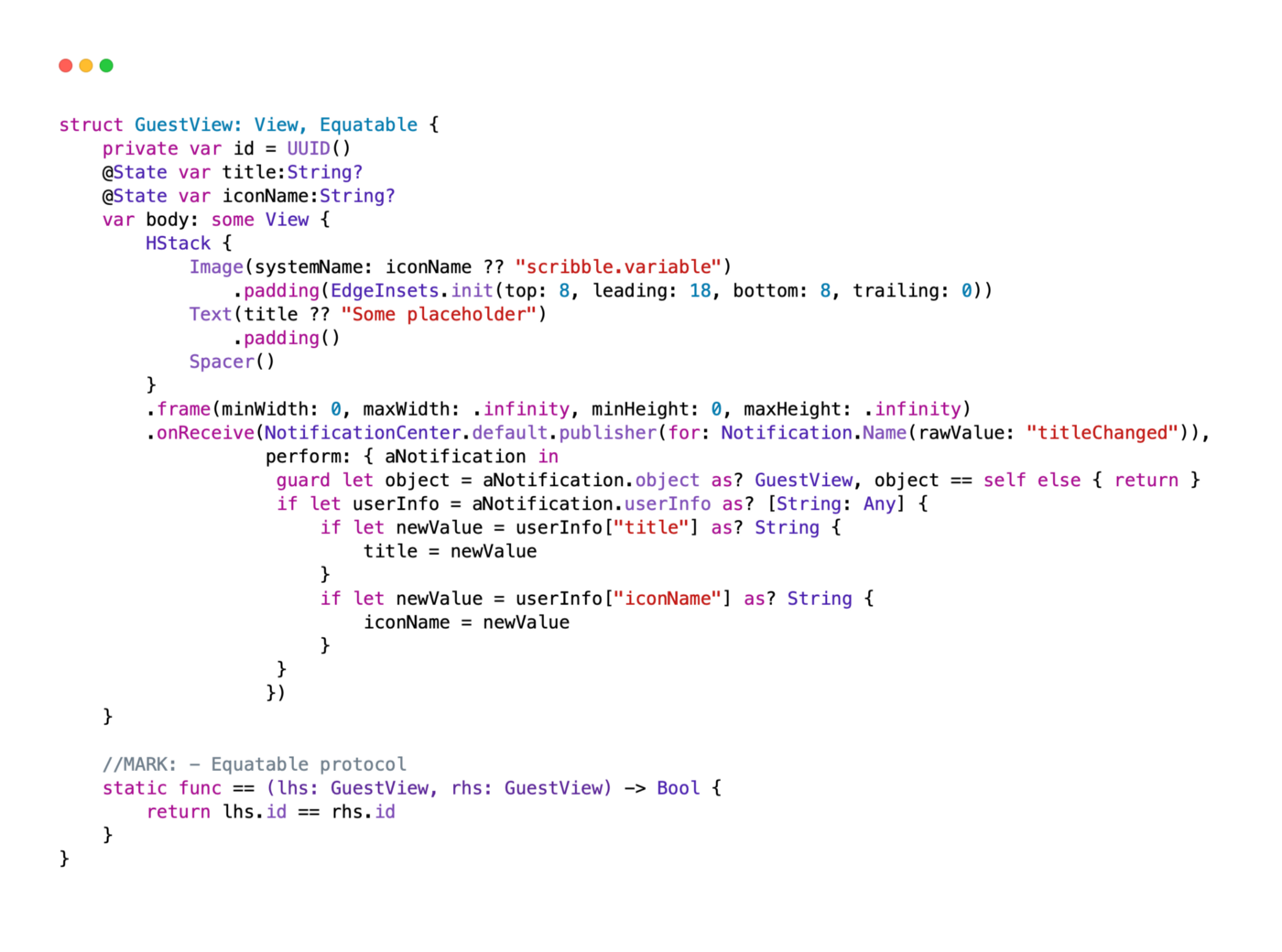
The SwiftUI counterpart is really simple. Here we create just an HStack container, in order to old both thumb image and title. We, also, adjust the frame in order to get all the space available without further constraints (the corresponding UIView that hold us will be responsible for the container dimension, ndr.). **onReceive** we will update our corresponding states, making the view update itself where required.
You’ll notice that I made the struct itself conform to Equatable, by adding both an *id* and the relevant override method. This’s required in order to distinguish if we need to discard or take into account the received published method coming from **NotificationCenter**.
That’s all. Even if the above solution is a really hackish / over-engineered cell architecture, I’m really impressed by results: scrolling is smooth and without any glitch.
I’m pretty sure that there should be other ways to achieve the same result with less boilerplate and/or in a much more elegant way (especially for the UIKit to SwiftUI communication).
I can not wait to see your comments / commits. The full code is available here on GITHUB.